
Every action,
one click away.
Right-click anything in your nail salon dashboard to get what you can do with it, and search everything as you type: clients, appointments, phones, amounts and dates, with the action ready to go.
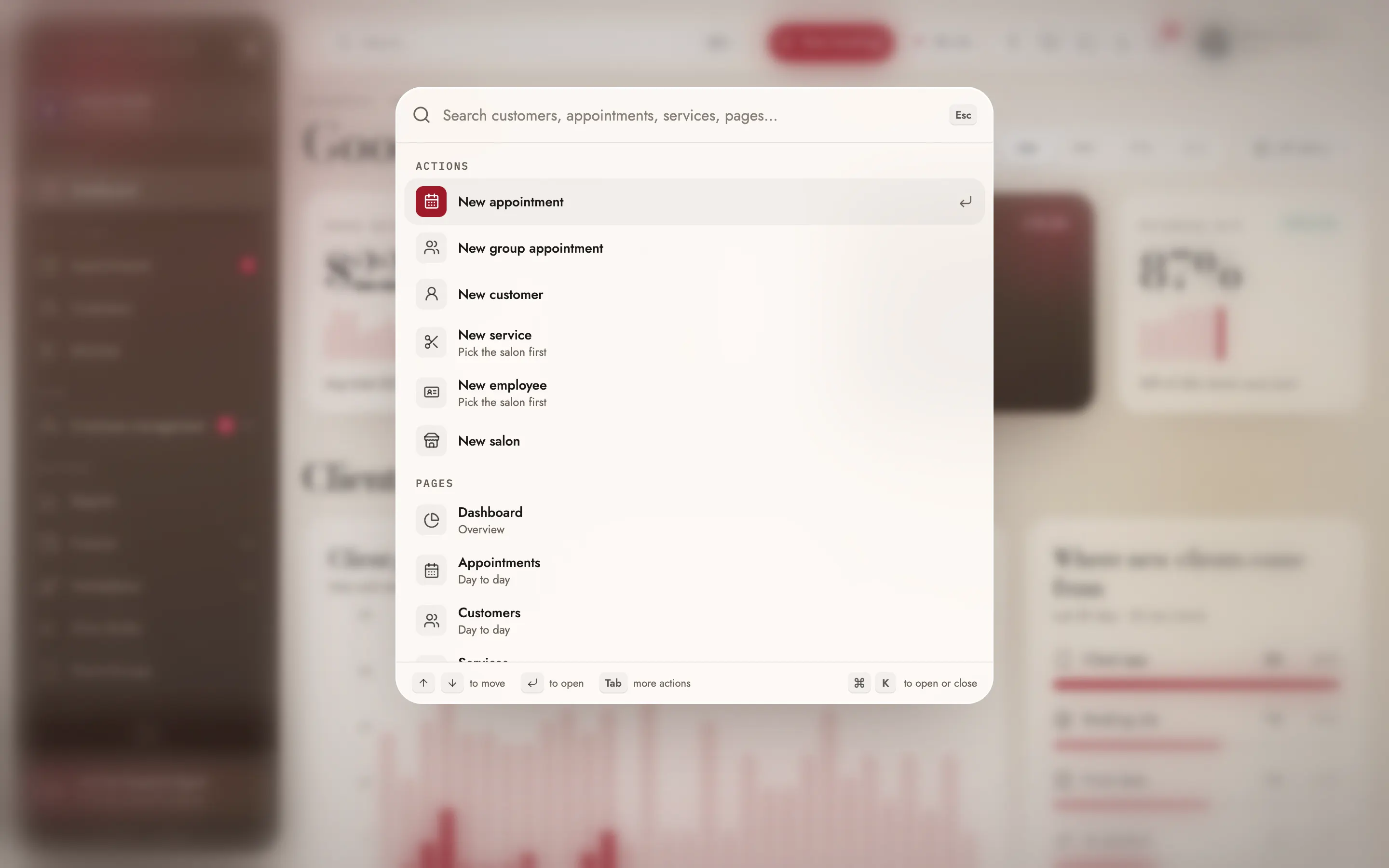
Nail salon software that answers in one keystroke.
A busy front desk doesn't have time to hunt through menus. Press ⌘K, Ctrl+K or just "/" and type: a client's name or phone, a service, a tech, a gift card or a page. Type a day and a time, like "friday 4", and it offers to book a new appointment then; type a phone that isn't on file and it offers to add the client; type an amount and it offers to issue a gift card.
Right-click works the same way across the dashboard. On an empty slot of the appointment calendar it books that tech at that time; on an appointment it opens checkout, the client's profile or a new booking for them. Everything you can do from a menu is also a button, and every action follows the roles and permissions of whoever is signed in.
What you get.
Right-click menus everywhere
On the calendar, clients, services, team, payroll, reports, transactions, gift cards and more.
Book from an empty slot
Right-click an open time for a new appointment, a block or time off for that tech.
Act on an appointment
Quick look, edit, charge, book again, call or copy the phone, from one menu.
Act on any row
Every table row gets Open, its own actions and Copy, in one menu.
⌘K or /
Open search from any page with ⌘K, Ctrl+K or the / key.
Search that acts
Type a phone, an amount or a day and get the matching action.
Pages that arrive filled in
New appointments, clients and gift cards open with what you typed already in.
Never the only way
Everything in a menu is also a button, and the browser's own menu stays in text fields.
Type it, it's ready.
The search in the Maison Nails dashboard, the demo salon. A day turns into a booking, a new phone into a new client, an amount into a gift card. Right-click an empty slot to book that tech at that time.
- New with Linh
- Block for Linh
- Time off for Linh
How it works in your nail salon.
- 01
Press ⌘K or /
Search opens from any page of the dashboard.
- 02
Type what you know
A name, a phone, a day or an amount.
- 03
Pick the action
Arrows and Enter, or Tab for the result's own actions.
Who it helps.
Everyone in the salon sees Right-click actions & search from their own side.
The owner
Every action on every page, from charging to issuing a gift card.
Front desk
Books a walk-in on an open slot and finds any client by phone in seconds.
Manager
Gets the actions their role allows, right where they work.
Menus that know where you are
One animated glass menu, placed inside the screen, with full keyboard use: arrows, Enter, Escape and type-ahead. Links open in a new tab or copy, and tab strips list their tabs.
- Quick actions by permission
- Submenus and keyboard navigation
- Light and dark
Search that understands the front desk
Type a client's name, a few digits of their phone or their reward number, a day like "Friday at 4" or an amount like $50, and search offers the next step: book them, add a client with that phone, or issue a gift card.
- Names, phones and reward numbers
- Days and times in English or Spanish
- Amounts that issue a gift card
Search that does the next step
Each result brings its own actions: press Tab to call, text or copy a client's phone, and Cmd or Ctrl+Enter opens it in a new tab. Type a question and search hands it to the support agent.
- Call, text or copy from a result
- Open in a new tab
- Questions go to the support agent
Shortcuts the whole team picks up in a day.
Search finds more than people: help guide sections with their film length, actions like a new group appointment or switching the dashboard between English and Spanish, and recent items. With a client in the results, Tab offers call, text or copy phone without opening the profile, and a question typed into search goes to the support agent already filled in.
Because every shortcut opens a page already filled in, a new hire learns the calendar, gift cards and client list by doing, not by reading a manual.
Make the most of it.
Small habits that help your nail salon get more out of it.
Learn one shortcut
⌘K, or just /, takes you to any client, page or action without the mouse.
Right-click before you hunt
Looking for a button? Right-click the thing itself first.
Type the day in words
"Friday at 4" suggests a booking at that time, ready to fill in.
Questions about Right-click actions & search
Do I have to use right-click?
What can the search find?
Does search understand Spanish?
What happens when I type an amount?
Can I find a client by phone?
Is it included?
Works with the rest of EasySalon.
Right-click actions & search shares its data with these, so every part of the salon stays in step.
More in Dashboard
All features →- Live metrics & statisticsSales, clients and retention, live, per salon or all of them.
- Appointments calendarTeam day, list, month, week and day views, with drag and drop.
- Clients & servicesClient profiles, visits and rewards, plus your full service menu.
- Service menuServices, combos, add-ons and photos, shown the way clients will see them.
- Staff scheduling & teamTeam, schedules, time off and locations. You only pay for nail techs.
- Payroll, commission & tipsCommission, tips and no-show fees per tech, added up for you.
- Payments & readersStripe readers branded to your salon, every way clients pay, and Manual card.
- No-show protectionA card on file and a no-show fee you set, so an empty chair still gets paid.

Ready when you are.
Set up in about ten minutes. Start at 50% off for 3 months. We'll move your data for you.
Get started