
The right access
for everyone.
Decide exactly who sees what in your nail salon: owners, managers, front desk and techs each get the access their role needs, the front desk locks with a PIN, and system logs record what changed.
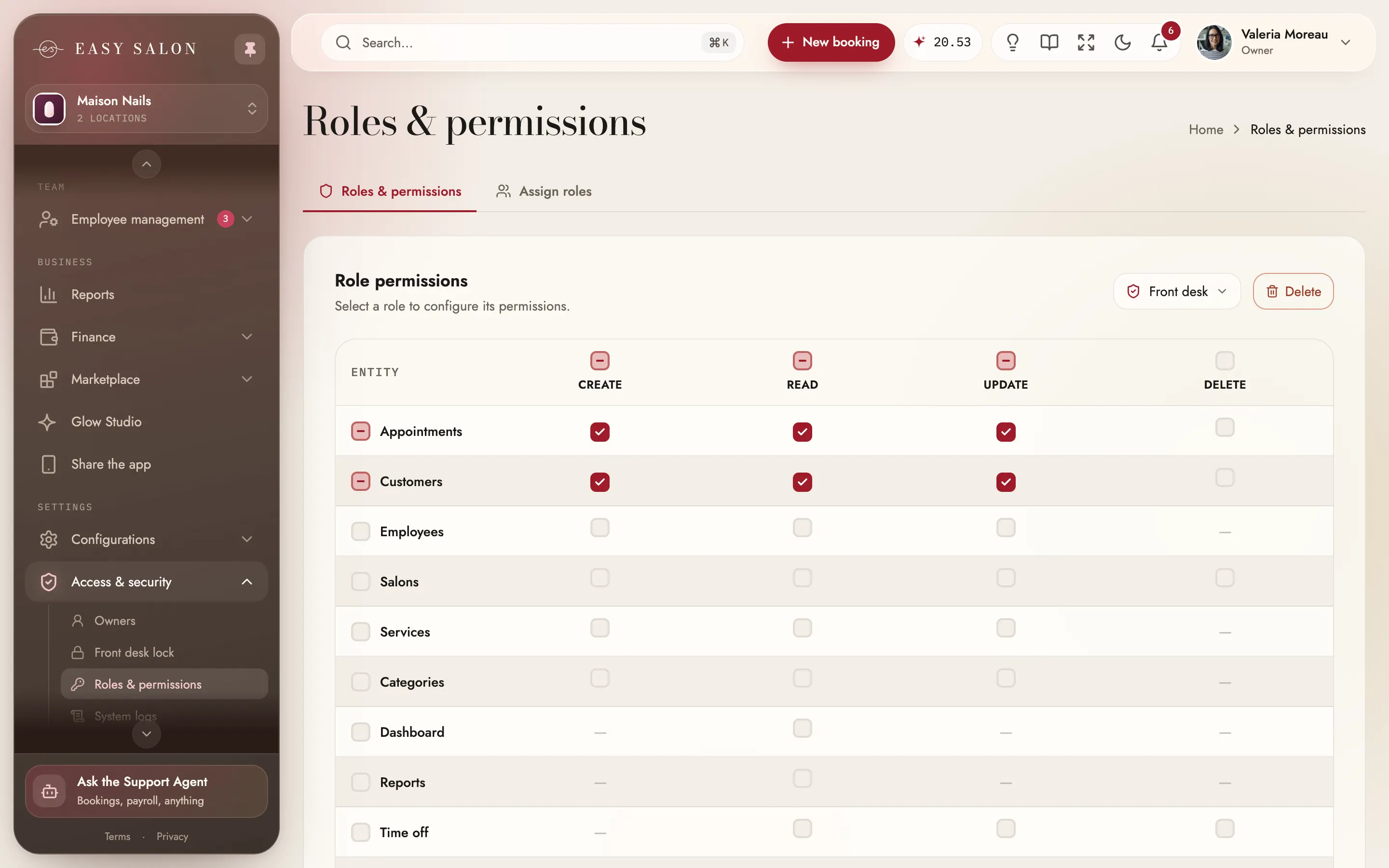
Nail salon software roles and permissions that protect the money and the clients.
A salon has many hands on one system: owners, managers, a front desk, nail techs and the substitute covering Saturday. Roles decide who can see and do what, from booking appointments to running payroll, and the system log keeps a record of every change, filtered by person, action, salon and date. Passkeys let anyone on the team sign in with Face ID, Touch ID or Windows Hello instead of typing a password.
What you get.
Roles & permissions
Manager, receptionist, nail tech and substitute roles, ready to use.
Your own roles
Choose what each role can create, read, update and delete.
Front desk lock
A front desk PIN opens the day's work; the owner PIN opens the rest.
Owner access times out
Owner access goes back to the front desk after 15 minutes idle.
Passkeys
Sign in with Face ID, Touch ID, Windows Hello or your phone.
System logs
Who changed what, and when, with filters.
Several owners
Add and edit owners from one screen.
A portal for each tech
Techs sign in to their own day, agenda and earnings.
One login, the right doors.
The front desk lock on the Maison Nails demo salon. Type a PIN: the desk opens the day's work with sales hidden, the owner opens everything. Below, what each built-in role can do.
- Appointments
- Clients
- Services
- Team
- Time off
- Transactions
- Payroll
- Reports
- Settings
| Appts | Clients | Reports | Payroll | |
|---|---|---|---|---|
| Manager | check_circle | check_circle | visibility | remove |
| Receptionist | check_circle | edit_note | remove | remove |
| Nail tech | visibility | visibility | remove | remove |
How it works in your nail salon.
- 01
Add your people
Give each one a role.
- 02
Set the PINs
A front desk PIN and an owner PIN.
- 03
Check the logs
See who changed what, whenever you need.
Who it helps.
Everyone in the salon sees Access & security from their own side.
The owner
Sets roles, PINs and owners, and reads the logs.
Front desk
Works the day's appointments and clients with the desk PIN.
Manager
Runs appointments, clients, services and the team.
Nail tech
Sees their own day, agenda and earnings.
A front desk you can leave open
The front desk works with a PIN that opens the day's work: appointments, clients, services and the team. Owner access closes on its own after 15 minutes, and a forgotten PIN is reset with the owner's password.
- PINs of 4 to 6 digits
- Owner access times out
- Reset with your password
Every change on record
System logs show what changed across the account and who did it, clients' own changes included. Filter by person, action, record, salon or dates.
- Account-wide logs
- Filters by person and action
- Search any change
Roles that match the salon
Managers run the day and the team, receptionists book and keep client details, and techs see their own work. Make your own role when someone needs something in between.
- Ready-made roles
- Your own roles
- Several owners
Access that fits how a nail salon really works.
Owners see everything. Managers, receptionists, nail techs and substitutes start from built-in roles, and you can build your own with a create, read, update and delete choice for every part of the dashboard. Techs work from their own portal and the team app, and client phone numbers and emails stay visible to owners only.
On a shared computer at the desk, the front desk lock keeps the day moving without opening the money: a front desk PIN opens appointments, clients, services and the team, while finance, reports and payroll need the owner PIN, and owner access closes after 15 minutes without activity. Sign in with a password or a passkey, and system logs record who changed what and when. Read more about how your data is kept on the security page.
Make the most of it.
Small habits that help your nail salon get more out of it.
Lock when you step away
Lock system takes the dashboard back to the front desk PIN.
Add a passkey
Sign in with your face or fingerprint instead of typing a password.
One login per person
The logs then show exactly who did what.
Questions about Access & security
Can techs see sales?
What is the front desk lock?
What if I forget my PIN?
Can I sign in with Face ID?
Can I make my own roles?
Is security an extra?
Works with the rest of EasySalon.
Access & security shares its data with these, so every part of the salon stays in step.
More in Dashboard
All features →- Live metrics & statisticsSales, clients and retention, live, per salon or all of them.
- Appointments calendarTeam day, list, month, week and day views, with drag and drop.
- Right-click actions & searchRight-click anywhere for quick actions; search that understands the front desk.
- Clients & servicesClient profiles, visits and rewards, plus your full service menu.
- Service menuServices, combos, add-ons and photos, shown the way clients will see them.
- Staff scheduling & teamTeam, schedules, time off and locations. You only pay for nail techs.
- Payroll, commission & tipsCommission, tips and no-show fees per tech, added up for you.
- Payments & readersStripe readers branded to your salon, every way clients pay, and Manual card.

Ready when you are.
Set up in about ten minutes. Start at 50% off for 3 months. We'll move your data for you.
Get started