Nail salon multi-location management software — one login for every shop.
Run two, three, or more nail salons from one owner account. Compare revenue across locations, manage techs who float between shops, and run location-level payroll — all without logging out and back in.
The problem
Opening a second nail salon shouldn't mean doubling your spreadsheets
Owners who expand to a second location quickly discover that running two shops from two separate systems is a full-time job on top of the one they already have.
Two logins, two systems, zero visibility
Each location runs its own booking app, its own payment system, and its own payroll spreadsheet. To see how both shops are doing, you log into each separately and manually add the numbers.
No way to compare revenue across locations
You know Location A felt busier than Location B on Friday, but you can't confirm it without pulling separate reports and reconciling them yourself. By the time you finish, next Friday has already started.
Techs who work at both shops need two profiles
A tech floats between your two locations. She has a login at each one, a different client history at each one, and her payroll runs out of whichever location she worked most that week. It's fragmented and frustrating for her and for you.
What EasySalon does
One nail salon platform, every location, consolidated at a glance
Add a location in EasySalon and it inherits your base configuration. Revenue, staff, and client data unify immediately.
- One owner login — all locations visible from a single dashboard
- Per-location reports: revenue, services, tech performance, and top clients
- Consolidated report: combined revenue across all locations in one view
- Tech profiles travel with the tech — one profile, any location
- Location-level payroll rules — different commission structures per shop if needed
- Shared client database — a returning client's history follows her across locations
- Per-location booking pages — each shop has its own public booking URL
- Inventory and service menu managed centrally or overridden per location
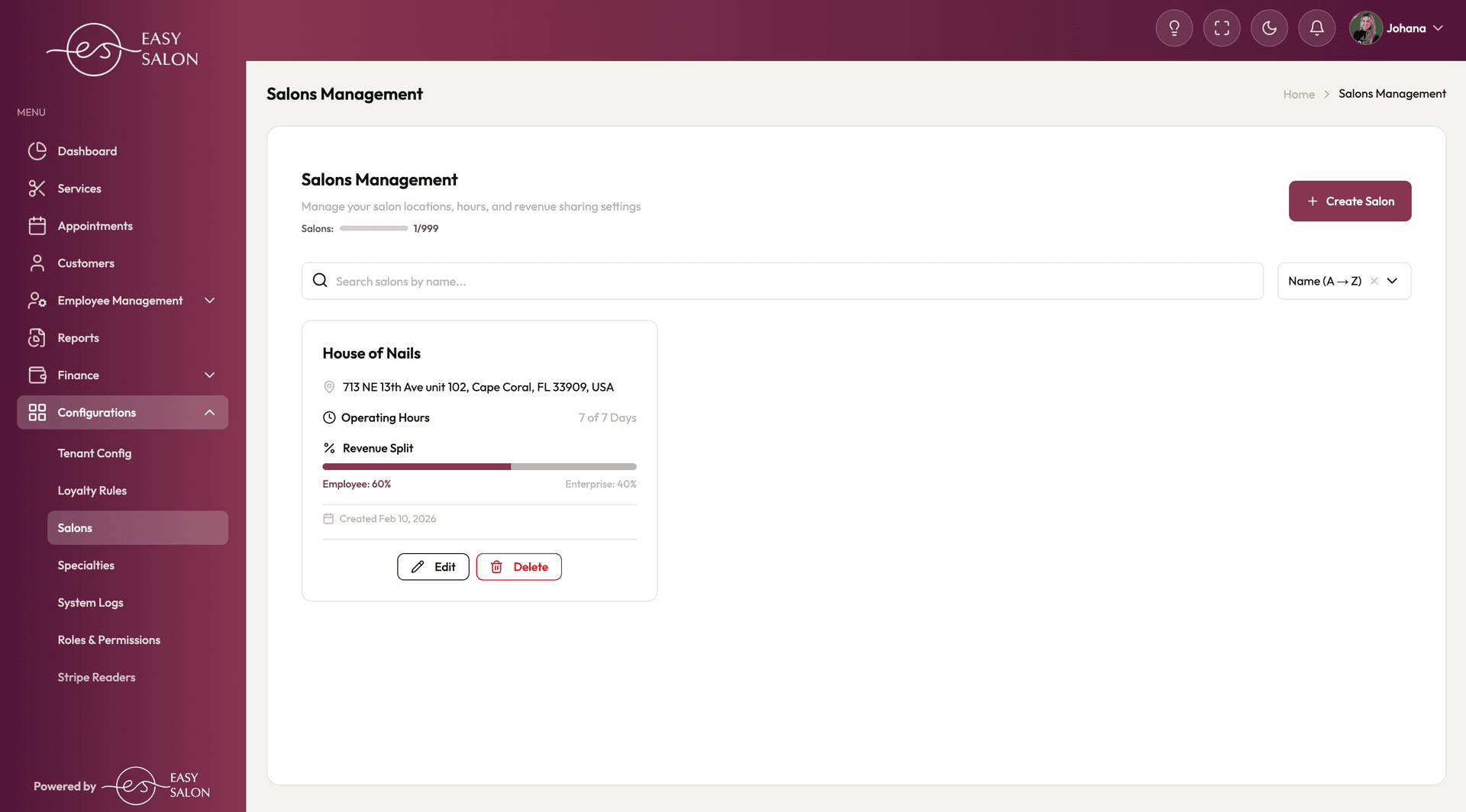
Salons management: each location gets its own hours, revenue split, and settings — manage up to 999 locations from one account.
Day-to-day
What running multiple nail salons looks like in EasySalon
Three moments where one login beats two spreadsheets.
Owner opens a second location without doubling her workload
After signing a lease for Location 2, the owner adds it to EasySalon in under 10 minutes. She copies her service menu, sets Location 2's specific hours and tech roster, and publishes the new booking page. Clients at Location 1 can see and book at Location 2 the same day it goes live.
Friday revenue comparison across three shops
After closing on Friday, the owner opens the consolidated report. She sees Friday revenue for all three locations side by side — services performed, average ticket, and tip totals per tech. She spots that Location 3 had the strongest day and makes a staffing note for next Friday.
Tech floats between two locations with one profile
A senior tech works three days at Location 1 and two days at Location 2. She has one EasySalon profile. Her client history, her comp rules, and her payroll totals follow her between shops. At the end of the week, payroll consolidates her hours and tips from both locations into one payout.
Related features
Multi-location depends on payroll and scheduling being centralized
Here is how EasySalon ties the locations together under one operational roof.
Multi-Location FAQ
Nail salon multi-location management questions, answered
Not seeing your question? Email support@easysalon.us — same-day reply.
EasySalon supports multiple locations under a single owner account. Each location is billed at the standard per-salon rate ({salonPrice}/month) plus the tech count at that location ({techPrice}/tech/month). Contact support@easysalon.us for specifics on volume pricing for larger groups.
Yes. Each location inherits your master service menu by default, but you can override prices, add location-specific services, or hide services that aren't offered at a particular shop. Changes at one location do not affect other locations unless you push them.
Yes. A tech has one EasySalon profile regardless of how many locations she works at. Her client relationships, her comp rules, and her payroll history are attached to her profile. When she logs into EasySalon at Location 2, she sees the same app she uses at Location 1.
Yes. The consolidated report shows total revenue, services, tips, and tech performance across every location you operate — in one view, for any date range. You can also filter down to a single location or compare two locations side by side.
Yes. Each location has its own public booking URL with its own hours, tech roster, and service menu. You can link each location's page from its Google Business profile, Instagram bio, or website independently.
Run every nail salon location from one screen.
Start a free trial of EasySalon and replace the per-location logins, the manual revenue reconciliation, and the floating-tech confusion with one owner dashboard that shows everything.
Free 14-day trial · Card required · Cancel anytime