
Reports that
answer questions.
Clear nail salon reports for any period: sales by employee, every salon side by side, cash reconciliation and client retention, each ready to export to Excel.
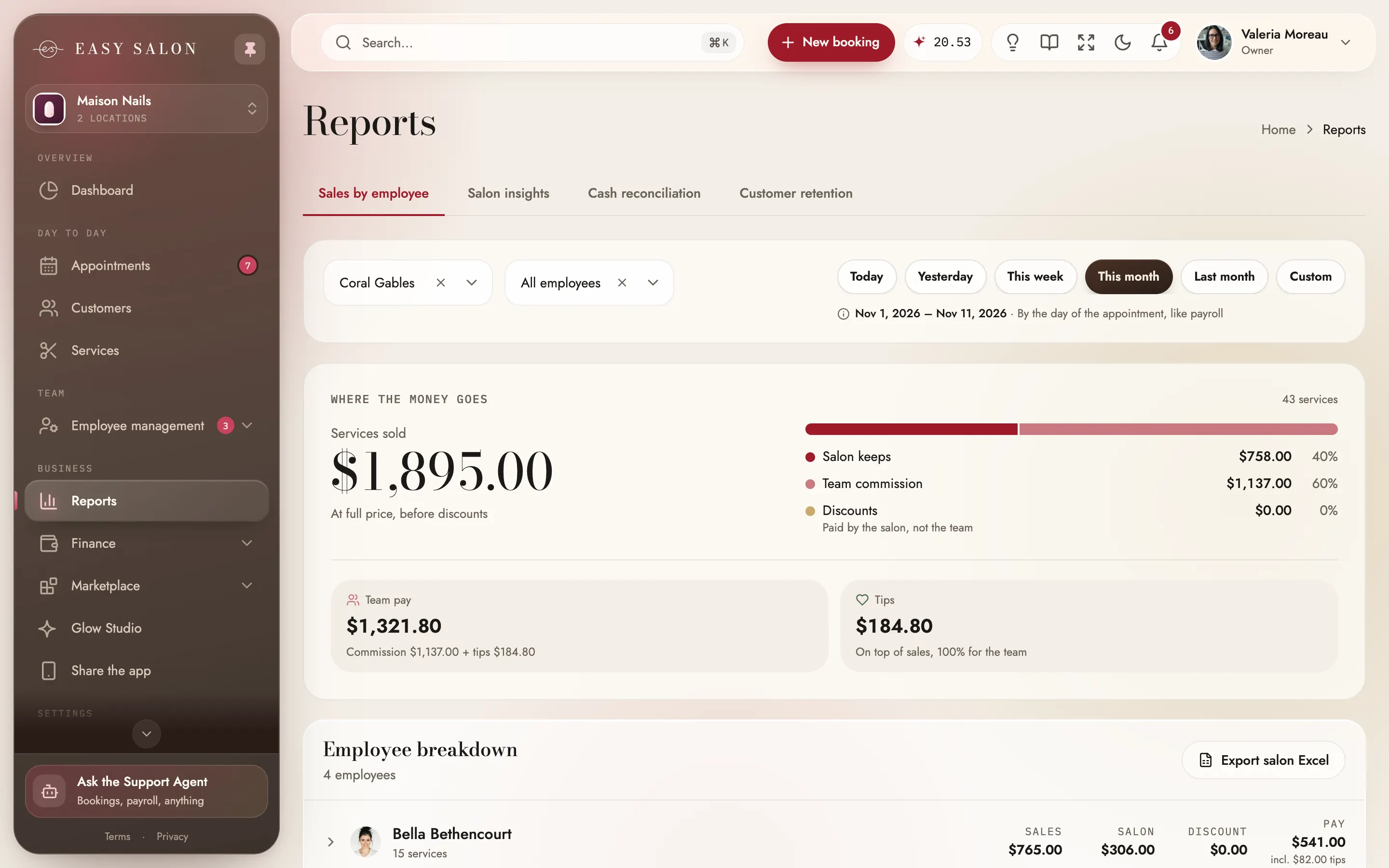
Nail salon reports for sales, pay and who comes back.
Four reports answer the questions owners ask most. Sales by employee shows each tech's services, the salon's share, discounts and pay. Salon insights puts every location side by side. Cash reconciliation checks the money taken by method, and Customer retention tells you how many clients from a month came back. Pick today, this week, this month, last month or your own dates, and export any of them to Excel, just like payroll.
What you get.
Sales by employee
Services sold, the salon's share, discounts and pay per tech.
Salon insights
Every salon side by side: sales, what the salon keeps, team pay, discounts and average ticket.
Cash reconciliation
One salon and one method at a time, with the net, tips, taxes, discounts and refunds.
Client retention
Pick a month and see who came back, across your whole business.
Any period
Today, yesterday, this week, this month, last month or your dates.
Export to Excel
Every tab exports in one click for your accountant.
Email a tech their report
Send one tech their own sales report.
Glow explains it
On Salon insights, Glow says what went up, what went down and what to do next.
Copy emails
Copy the emails from your retention list in one click.
The period follows you
The period you pick carries over between tabs.
How it works in your nail salon.
- 01
Pick a period
Today, this month, or any dates you choose.
- 02
Choose the report
Sales by employee, salon insights, cash reconciliation or retention.
- 03
Take it with you
Export any report to Excel in one click.
Who it helps.
Everyone in the salon sees Reports from their own side.
The owner
Sees every report for every salon, and asks Glow to explain the period.
Manager
Opens Reports to follow sales by tech and each salon.
Nail tech
Gets their own sales report by email when you send it.
Your accountant
Gets Excel files that match payroll.
Where the money goes
Sales by employee starts with the big picture, services at full price, team pay and tips, and breaks it down by tech, so you see exactly who earned what.
- Counted by the day of the appointment, like payroll
- Team pay is commission plus tips
- Tips go in full to the team
Every salon side by side
Salon insights puts every location next to each other for the same period. It reads the same payments as payroll, so the numbers match.
- Sales and what the salon keeps
- Average ticket per salon
- Numbers that match payroll
Close the day to the cent
Cash reconciliation counts by the day the money was taken, one method at a time, with every appointment, no-show fee, gift card and refund behind the net.
- Net per payment method
- Tips, taxes and discounts
- Opens on today
Clients who come back
Pick a base month and a window after it, and see the retention rate, who came back, who didn't, and their visits month by month.
- Retention rate by month
- Search by name, phone or email
- Copy emails in one click
Numbers that agree with the rest of EasySalon.
Sales by employee and Salon insights are counted by the day of the appointment, the same way payroll is, so the totals match line for line. Cash reconciliation follows the day the money was taken, next to the transactions and payouts it comes from. Send a tech their own sales report by email, or let Glow explain a period on Salon insights: what went up, what went down and what to try next.
For the day-to-day view, the live metrics on the dashboard home cover sales, clients and busy hours, and owners with several salons get the full picture in multi-location reporting.
Make the most of it.
Small habits that help your nail salon get more out of it.
Reconcile every day
Cash reconciliation opens on today, so a quick check at closing keeps the register right.
Check retention monthly
Pick last month as the base, see who came back, and copy the emails of those who didn't.
Ask Glow for the story
On Salon insights, Glow explains what changed since the period before and what to try next.
Questions about Reports
Can I export reports?
Do reports include every location?
Do they match payroll?
Is reporting included?
Can I see sales by tech?
Is there a reconciliation report?
Can my manager see reports?
What does Glow add?
Works with the rest of EasySalon.
Reports shares its data with these, so every part of the salon stays in step.
- Payroll, commission & tipsCommission, tips and no-show fees per tech, added up for you.Learn more
- Live metrics & statisticsSales, clients and retention, live, per salon or all of them.Learn more
- Multi-location reportingEvery salon, one login: reports, payroll and payouts per location.Learn more
- Transactions & gift cardsEvery payment, reconciliation and gift cards in one place.Learn more
More in Dashboard
All features →- Live metrics & statisticsSales, clients and retention, live, per salon or all of them.
- Appointments calendarTeam day, list, month, week and day views, with drag and drop.
- Right-click actions & searchRight-click anywhere for quick actions; search that understands the front desk.
- Clients & servicesClient profiles, visits and rewards, plus your full service menu.
- Service menuServices, combos, add-ons and photos, shown the way clients will see them.
- Staff scheduling & teamTeam, schedules, time off and locations. You only pay for nail techs.
- Payroll, commission & tipsCommission, tips and no-show fees per tech, added up for you.
- Payments & readersStripe readers branded to your salon, every way clients pay, and Manual card.

Ready when you are.
Set up in about ten minutes. Start at 50% off for 3 months. We'll move your data for you.
Get started